entry-25
Swapping the network core without changing the network
The ER605 and Omada switch came out and a UniFi Dream Machine Pro and USW-24-PoE went in, with the same subnet, gateway, DHCP, and DNS as before. Part 2 of 2: the equivalent-state cutover, done in two stages with about two minutes of real downtime.
revisions rev. 1 first set 2026-10-23 last revised 2026-10-23 9 min read
series / netlab part 3 of 4 all parts → ← prev next →
Update (2026-10-19): The bench baseline is now published; the unpublished label below describes the state when this account was written.
A bench baseline pass (unpublished) put a UniFi Dream Machine Pro and a USW-24-PoE switch through isolated testing with no path to production. This is part 2: taking out the ER605 and the TP-Link switch and putting the UniFi gear in their place.
The goal was narrow on purpose. After the swap, the network should look exactly like it did before. Same subnet, same gateway address, same DHCP pool and lease time, same DNS handed out, same reserved addresses. The only thing allowed to change was the hardware.
Why equivalent-state first
The reason for new gear is segmentation. The flat network was always the first step, and VLANs are the next one (the ER605 cutover was built as that foundation).
It would have been tempting to do both at once: new router, new switch, new VLANs, new subnets. That’s three changes on the night, and if something breaks you don’t know which one did it. So the rule was one variable at a time. First swap the hardware and prove the network behaves the same. Then, once it has run clean for a while, start carving it up.
That meant writing down what “the same” actually is. I pulled the current state from the Omada controller’s API and from a real DHCP lease on a client, and turned it into a target sheet:
- one flat network, no VLAN tags
- the same gateway address, on the same /24 subnet
- DHCP pool
.100to.199, two-hour leases - one DNS server handed out: the Pi-hole VIP, nothing else
- the reserved addresses carried over as fixed IPs, minus two that were already disabled and belong to retired hardware
- zero firewall rules, port forwards, or NAT exceptions, because the ER605 had none
The lease check was worth doing. The controller export didn’t list a DHCP domain name, but a real lease showed the ER605 was handing one out, so that went on the sheet too. The export only showed what was configured, and the lease showed what clients were actually receiving.
The gates, and which ones got waived
The plan had a list of things to prove before any cable moved. Most were done well ahead of the night:
- The DNS failover test. I forced the Pi-hole VIP from one node to the other while a loop of lookups ran against it once a second. One lookup timed out during the handover, everything else answered, and the VIP moved back cleanly afterwards. If DNS HA didn’t hold, a gateway swap was the wrong time to find out.
- The Proxmox node that had been rebooting. It had been clean for a week since its power was moved. The root cause still isn’t confirmed, so calling that stable enough was a judgment call, and I made it.
- No Proxmox HA resources configured, so no cluster manager would try to move guests around if a node lost the network for a minute.
- Firmware auto-update turned off on the UniFi side, so nothing would upgrade itself mid-window.
- The UniFi gear on a known-good power strip. The old gear, which was now the rollback path, went on the UPS I don’t fully trust. Not ideal, but it only had to hold if I rolled back.
Some gates I waived, and I’d rather say so than pretend otherwise. I didn’t run a second full practice on the bench as its own step. The UDM was already configured with the WAN settings and every reservation before the window, and part 1 had already covered adoption, reboots, and a restore. I also never confirmed that an alert silence was set for the window. Monitoring had zero active alerts at acceptance, so nothing was lost, but it’s on the list for next time.
The 2026-09-20 attempt
The swap was planned for the evening of 2026-09-20, and it did not go ahead. The decision record for that evening lists what was still open: a bench rehearsal of the staging steps, the AT&T passthrough record, and the alert silences. The Phase 48 authorization came on 2026-09-22, and the cutover ran on 2026-09-27. The DNS failover test on the evening of 2026-09-20 did run, at 19:18 EDT, and its result is one of the gates above.
Stage 1: the switch, while the old router still routes
The swap ran in two stages so that only one thing changed at a time.
Stage 1 replaced the TP-Link switch with the USW. The ER605 stayed in place as gateway and DHCP server. If the new switch misbehaved, the router was known-good and the problem had to be the switch.
The USW had been given the old switch’s management address, .2, ahead
of time, and the plan had the old switch fully out before the new one
powered on. Two devices with the same address on one network would have
made every later check ambiguous.
The checkpoints, all EDT on 2026-09-27: the pre-window check passed at 20:03:40. The switch swap was done before 20:19, and its post-stage check ran at 20:19:35. The gateway swap came around 20:30, the desktop had its first lease from the UDM at 20:31:01, and the final post check passed at 20:31:53. From the first check to the last, the cutover took about 28 minutes. Acceptance checks carried on until about 20:40.
The post-stage check found one failure: the switch’s management address didn’t answer the first ping. An immediate re-ping got three out of three, and the device answering was the new switch. It had still been settling. I logged it as a timing blip rather than a failure, because the thing the check cares about, the switch answering at its address, was true a second later. Everything else passed. All 29 monitoring targets were up and no node or guest had rebooted. Prometheus saw the cable move: up to two of the 29 targets dropped for about 45 seconds starting at 20:17:15, and all 29 were back by 20:18:00.
Stage 2: the gateway, and never two routers
Stage 2 was the part that could take the house offline.
The rule for this stage was simple: never two routers on the LAN, and never two routers on the ISP gateway. The ER605 came out completely, WAN and LAN, before the UDM’s WAN port was connected. Two devices offering DHCP on the same flat network means clients take leases from whichever answers first, and some of them get the wrong gateway.
The WAN side had one extra wrinkle. The ISP gateway runs in IP passthrough mode, and it hands the public address to one specific device, identified by its MAC address. There were two ways to deal with that:
- change the ISP gateway’s setting to point at the UDM, or
- have the UDM present the same WAN MAC address the ER605 used, so the ISP gateway sees no change at all.
I went with the second, a MAC clone on the UDM’s WAN port. It meant not touching the ISP gateway during the window, and the way back was just as simple: put the ER605 back and nothing on the ISP side needs undoing. The first option stayed as the fallback, with a time limit on how long to try before rolling back.
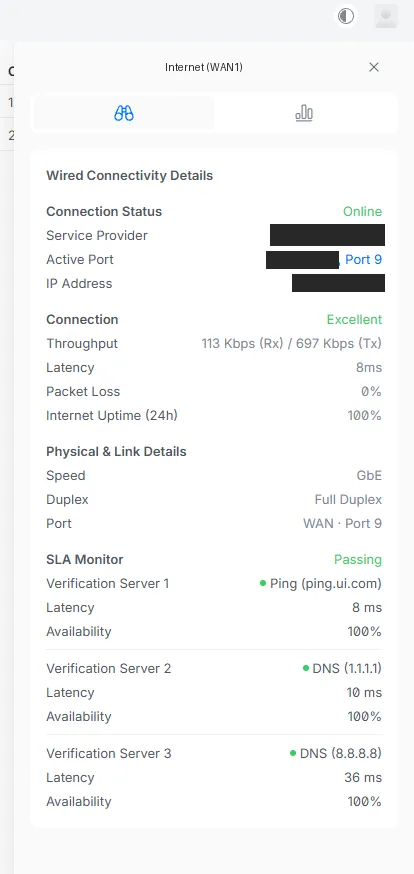
It worked on the first try. The UDM picked up the public address, and real internet downtime was about one to two minutes. The household TV had no disruption. Nothing on the LAN noticed either: Prometheus stayed at 29 of 29 targets up through the gateway swap. Only internet access blinked.
What “passed” meant
Internet coming back was the start of validation, not the end of it. The real test was whether everything that depends on the network still worked:
-
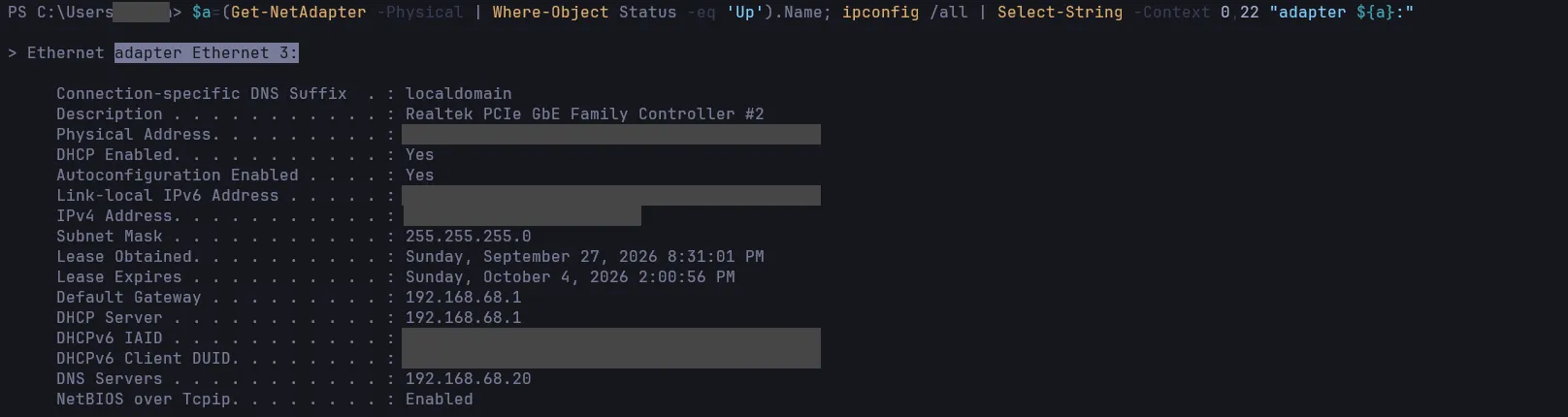
A desktop released and renewed its lease. At 20:31:01, right after the gateway swap, it got its first lease from the UDM: its reserved address, with the DHCP server and gateway at the UDM Pro’s address and the Pi-hole VIP as its only DNS server. That one lease proves the new DHCP server is live and handing out the right options.
-
Exactly one device answered at the gateway address from each of the three Proxmox nodes, and it identified as UniFi. The old router’s hardware address was gone from the ARP table. That’s the proof the ER605 is really out, not just unplugged in theory.
-
DNS resolved through the VIP and through each Pi-hole node directly, and the VIP was held by only one node.
-
The service ports all answered: Proxmox on all three nodes, the backup server, the container manager, remote support, monitoring, and the old Omada controller.
-
Monitoring showed 29 of 29 targets up and zero active alerts.
-
Internet by ping and by HTTPS.
-
The primary Tailscale subnet router was online and carrying the LAN route. The standby router was online too, but reported a couple of health warnings. They turned out to predate the cutover: the standby router that couldn’t tell time.
-
No node or guest rebooted.
In the UniFi console, the switch showed as adopted and online, auto-update was off at that point, and the UDM was the only DHCP server on the network.
What’s next
The network ran clean after the cutover, and the stability period was accepted on 2026-09-28. The old router and switch were unplugged that day and are retired. Phase 48 closed on 2026-09-29.
After that comes the reason for all of this: VLANs. The network is still flat, exactly as planned, and segmenting it is the next phase, with its own plan and its own write-up.
Closing note
The whole night was built on one decision: change the hardware, not the network. Every value that mattered was written down before the window, from the controller and from a real lease, so the new gear had a target to match rather than a vague idea. Splitting the swap into two stages meant that when the one check failed, there was only one thing it could be. Keeping the old gateway completely off the network before the new one came up meant DHCP never had two answers. The result was about two minutes of downtime.
Related posts: Seven days on a power strip: a Proxmox node saga, Moving my home network from Omada to UniFi, looking back.