entry-33
Moving my home network from Omada to UniFi, looking back
I replaced the router and core switch under everything in the lab, Proxmox hosts, DNS, backups, and remote access included, without changing the network they sit on.
revisions rev. 1 first set 2026-10-23 last revised 2026-10-23 4 min read
series / netlab part 4 of 4 all parts → ← prev
Update (2026-10-19): The bench baseline is now published, and the patching account records the October follow-up.
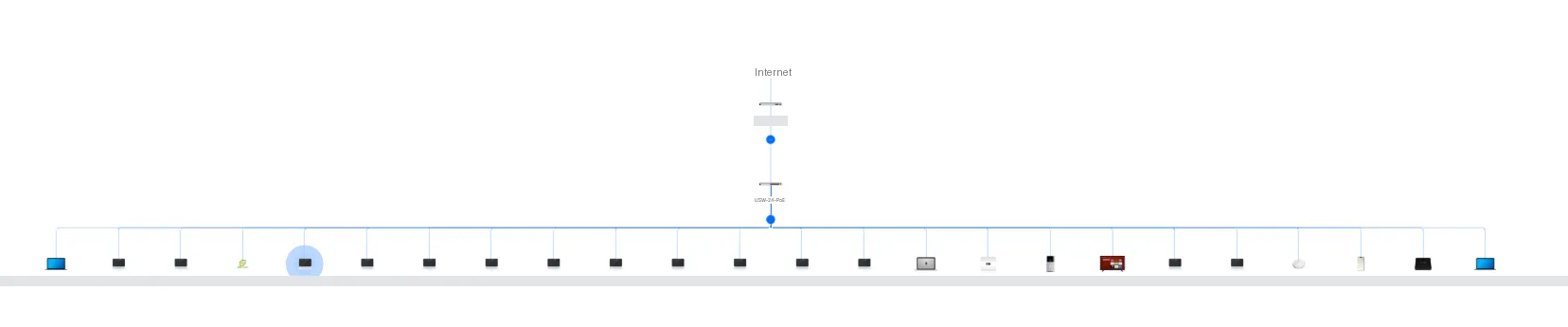
This one was a big deal for me. Most lab changes touch one service. This one replaced the router and the core switch that every service sits behind: three Proxmox hosts, the Pi-hole pair and its virtual IP, the backup server, the Tailscale subnet routers that make the lab reachable when I’m away, and the monitoring that tells me when any of that breaks. All of it on one flat home LAN. If the swap went badly, it didn’t take one thing down. It took everything down, including the tools I would use to find out why.
The step-by-step for the cutover night is in part 2; the bench baseline pass that came before it is still unpublished. This post is the look back.
The night, briefly
It ran on the evening of 2026-09-27, after the Proxmox node that had been rebooting (seven days on a power strip) had a full clean week behind it.
Part 2 has the details: the rule I held to (change the hardware, not the network), the two stages that evening, the WAN MAC clone that kept the ISP side unchanged, the one ping that missed after stage 1, and the full list of checks that passed afterwards. I won’t repeat them here.
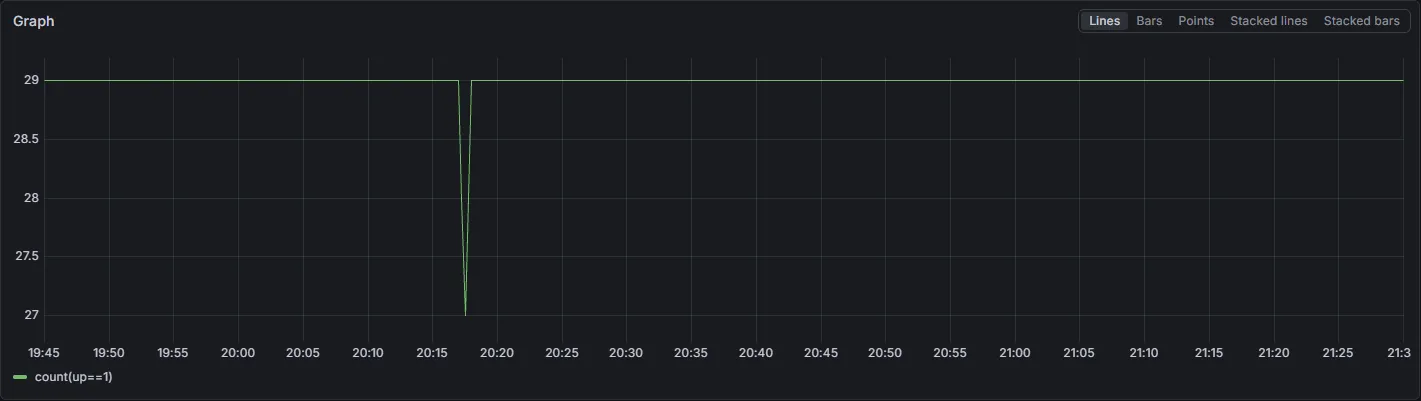
The number that mattered most came from one Prometheus query. My Grafana
dashboards had no panel for target count, so I went to Explore and ran
count(up==1) at a 15-second step across 19:45 to 21:30 EDT on
2026-09-27. All 29 targets were present for the whole window, with no
scrape gaps. The only dip was the switch swap: 28 at 20:17:15, 27 at
20:17:30, 28 at 20:17:45, and back to 29 by 20:18:00. About 45 seconds.
The gateway swap around 20:30 didn’t move the line at all. Only internet
access blinked; everything on the LAN stayed up.
What needed a second pass
Not everything was clean, and I’d rather write down the rough edges than pretend there weren’t any.
The standby Tailscale subnet router came back online but with health warnings. I wrote that up separately: the standby router that couldn’t tell time.
A few checks I had wanted before the window never happened. I didn’t run a second full practice on the bench as its own step. The UDM was already set up with the WAN settings and the reservations, and part 1 had already covered adoption, reboots, and a restore. I never confirmed that an alert silence was set for the window either, which was fine only because nothing alerted. One DHCP reservation, for a node whose hardware was swapped earlier, was still unchecked after the window. On 2026-10-04 the UniFi fixed-IP list was checked: there is no fixed-IP entry for that node, so there was nothing to correct. That node is static anyway.
What I’d do differently
- Health-check every standby and fallback component before the window, not only after. The standby router post is why.
- Set the alert silence. Zero alerts is a result, not a plan.
- Keep a short list of things that have to reconnect on their own after a WAN drop, and check them in the post-stage run.
- Take the “after” photos on the night, while the rack is open and the labels are fresh.
What’s next
Most of the follow-ups from the window are closed. UniFi firmware auto-update went back on on 2026-10-04. The three Proxmox nodes were patched on 2026-10-04, one at a time, and the cluster kept quorum through each reboot. The reservation check is done, as described above.
Still open: the after-the-cutover photos, which I still need to take, and the logger evidence that supplements the DNS failover test from the 2026-09-20 evening.
After that comes segmentation, the reason I bought the gear in the first place. That gets its own plan and its own write-up.