entry-11
The DNS panel that wasn't authoritative
Deploying Caddy for status.stayz3ro.dev should have taken an hour. It took a night, because every DNS record I added went to a zone nothing on the internet was reading anymore.
revisions rev. 1 first set 2026-10-23 last revised 2026-10-23 5 min read
series / VPS part 2 of 4 all parts → ← prev next →
Phase 3 of the VPS lab was meant to be short. Put Caddy in front of Uptime
Kuma, get a Let’s Encrypt cert for status.stayz3ro.dev, done. Caddy does
ACME automatically. This is close to a solved problem.
Instead it turned into a night of DNS debugging, and two of the three lessons had nothing to do with Caddy.
The symptom
Caddy started, tried to issue a certificate, and failed with a real ACME
error: Let’s Encrypt got NXDOMAIN for status.stayz3ro.dev.
The record existed. I’d just added it in Porkbun’s DNS panel. And querying Porkbun’s own nameservers directly returned the right answer.
The first theory, which was wrong
DNS negative caching. The record had genuinely been missing a few minutes
earlier, and the zone’s negative-cache TTL was 1800 seconds, so a resolver
that looked it up during that window would hold the NXDOMAIN for half an
hour.
Plausible, and partly true, but not the cause, because it kept failing well past any TTL that could explain it.
The check that actually told the truth
When resolution makes no sense, stop trusting the resolver in front of
you. I queried the domain over DNS-over-HTTPS (plain HTTPS to
https://dns.google/resolve, which never touches port 53 and can’t be
intercepted by anything local) and asked for the nameservers:
# via DoH, bypassing every local resolver
dig NS stayz3ro.dev
felipe.ns.cloudflare.com
melissa.ns.cloudflare.comNot Porkbun’s. Cloudflare’s.
The domain’s nameservers had been switched to Cloudflare when the blog moved to Cloudflare Pages, a separate decision, in a different repo, made around the same time. Porkbun’s DNS hosting still let me log in and edit records, and its nameservers still answered when queried by name. But the internet’s chain of delegation, from registry to nameservers to zone, no longer pointed at Porkbun. Every edit I made that night went to a zone nobody was reading.
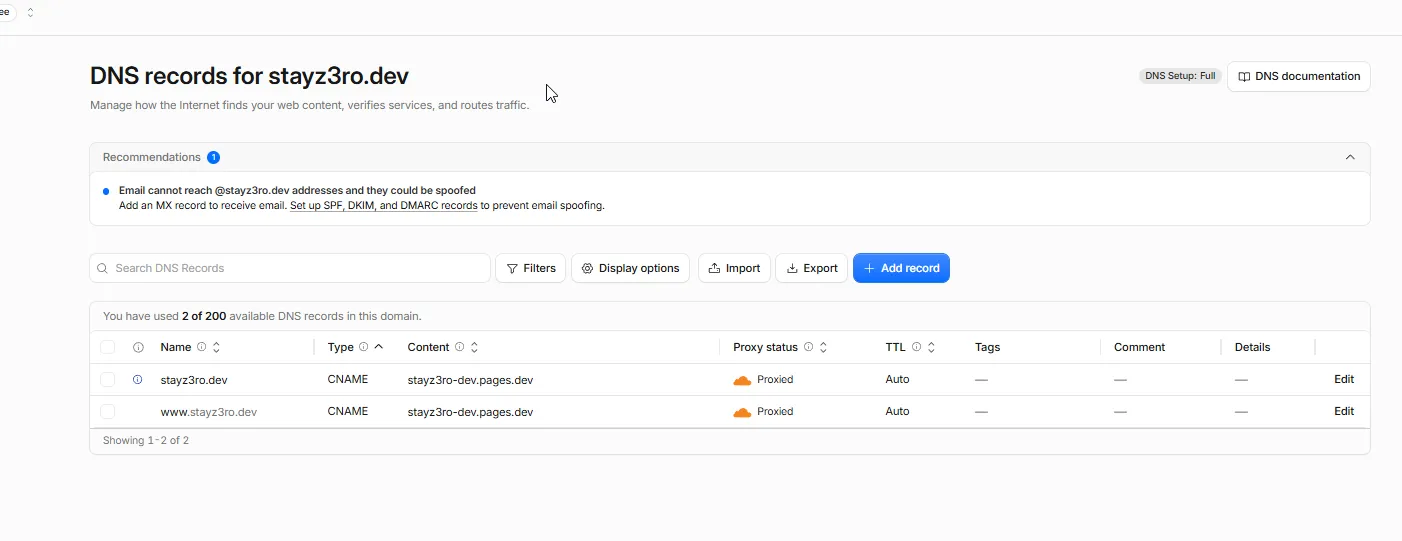
The fix was one record, added in the right dashboard. Caddy picked it up and issued the cert on the next retry:

A panel that lets you edit records is not proof it’s the zone that’s
delegated. dig NS <domain>, through a resolver you don’t control, tells
you which nameservers the internet actually uses in one query. An
unexpected answer carrying the aa (authoritative answer) flag is the
signal to stop debugging your symptom and check the delegation itself.
The compounding trap
There was a reason my earlier “check against a different resolver”
attempts hadn’t caught this. The workstation running every dig had
Tailscale’s MagicDNS enabled, pointing the system resolver at
100.100.100.100. Tailscale can transparently intercept port-53 traffic
system-wide, including an explicit dig @8.8.8.8. So “I checked against
Google’s DNS too” was, unknown to me, still being answered by the same
local proxy.
DoH sidesteps this because it’s just HTTPS. There’s no port 53 to intercept.
When a machine runs a VPN or a MagicDNS-style resolver, naming a different
DNS server on the CLI doesn’t guarantee an independent answer. Check the
resolution path itself (resolv.conf, tailscale dns status), or use DoH
and skip the question.
The one that had nothing to do with DNS
While waiting on propagation, a third problem. Uptime Kuma’s first-run setup, the screen where you create the admin account, is unauthenticated by design. Whoever loads the page first claims it.
And the moment Let’s Encrypt issues a certificate for a hostname, that hostname is published in Certificate Transparency logs, which bots scan continuously. There’s a real window between “cert issued” and “admin account created” where a stranger could win the race.
The fix didn’t need rushing or exposing anything early. Docker’s bridge network means the VPS host can always reach a container directly, even with no published port:
ssh -L 3001:<container-ip>:3001 <vps-host>
# now http://localhost:3001 tunnels straight to Kuma, bypassing
# the public hostname, Caddy, and the cert entirely
Admin account claimed over the tunnel before DNS had even finished propagating. From outside, the backend port stays unreachable:

For any self-hosted service with unauthenticated first-run setup, claim
the admin account over a private path (SSH tunnel, VPN, docker exec)
before the public hostname resolves. Don’t plan to be faster than a bot.
Closing note
Four things I took away from the night. Confirm the delegated zone before
you debug DNS propagation, with dig NS over DoH first. A VPN can
intercept your dig, so verify the resolution path or use DoH. “Public”
and “publicly discoverable” arrive on different timelines, DNS and cert
issuance versus CT-log scanning, so secure first-run setup through a
private path. And a runbook step that assumes a default needs checking
against the actual config. docker compose logs caddy was silent here,
because this Caddyfile logs to a file, not stdout. The evidence was in the
file the whole time.
Related posts: Moving my portfolio from GitHub Pages to Cloudflare Pages, stayz3ro.dev on Cloudflare: one zone, a static blog and a VPS, Moving the blog and status page to a new domain, Umami behind a Cloudflare-only firewall.